
The Quick Answer
A customer experience AI platform is software that improves customer outcomes by understanding conversations and taking action across channels. The real divide is whether it optimizes insights (analytics, sentiment, QA) or outcomes (autonomous resolution, proactive outreach, and smart escalation). Teammates.ai is built for outcomes with autonomous, integrated AI Teammates across chat, voice, and email, in 50+ languages including Arabic.
Customer experience AI platforms are split into two camps
Most buyers think they are shopping for “CX AI” when they are really comparing four different product categories: chatbots, CCaaS features, CRM add-ons, and actual platforms. Demos blur these lines by showing fluent answers, but fluency is not execution. If it cannot complete workflows across channels, it cannot move your unit economics.
Here’s a practical taxonomy you can use in 5 minutes:
| Category | What it is | What it’s good at | Where it fails at scale |
|---|---|---|---|
| Chatbot | Single-channel Q&A and deflection | FAQs, basic status checks | Breaks on edge cases, weak tool execution, limited governance |
| CCaaS feature | Contact center vendor AI layer | Transcription, summaries, basic routing | Often channel-bound, shallow orchestration, limited auditability |
| CRM add-on | AI inside Salesforce/HubSpot | Suggestion and logging | Rarely resolves end-to-end, often “assist” not “do” |
| Customer experience AI platform | Cross-channel understanding + tool execution | End-to-end resolution, proactive next best action | Hardest to build: needs integrations, policies, evaluation, and ops |
The real line in the sand is simpler: insights-optimizers vs outcome-optimizers.
- Insights-optimizers produce sentiment graphs, QA scores, and “top intents.” Useful, but they do not change outcomes unless humans do extra work.
- Outcome-optimizers resolve, route, escalate, and update systems of record with permissions and logs.
This is where TOFU buyers get misled. A demo that answers 10 canned questions is meaningless if the platform cannot: open or update a Zendesk ticket, change a subscription, collect identity signals safely, issue a refund, and then document the decision trail.
If you are building an autonomous multilingual contact center, translation is not the bar. Parity is. The platform must handle Arabic and dialect variance with the same containment quality, escalation precision, and policy compliance you accept in English. If your vendor cannot show parity testing, you are buying “translated scripts,” not scalable outcomes.
If you want the straight-shooting view on routing foundations, start with intention detection. Intent is only valuable when it maps to an executable outcome.
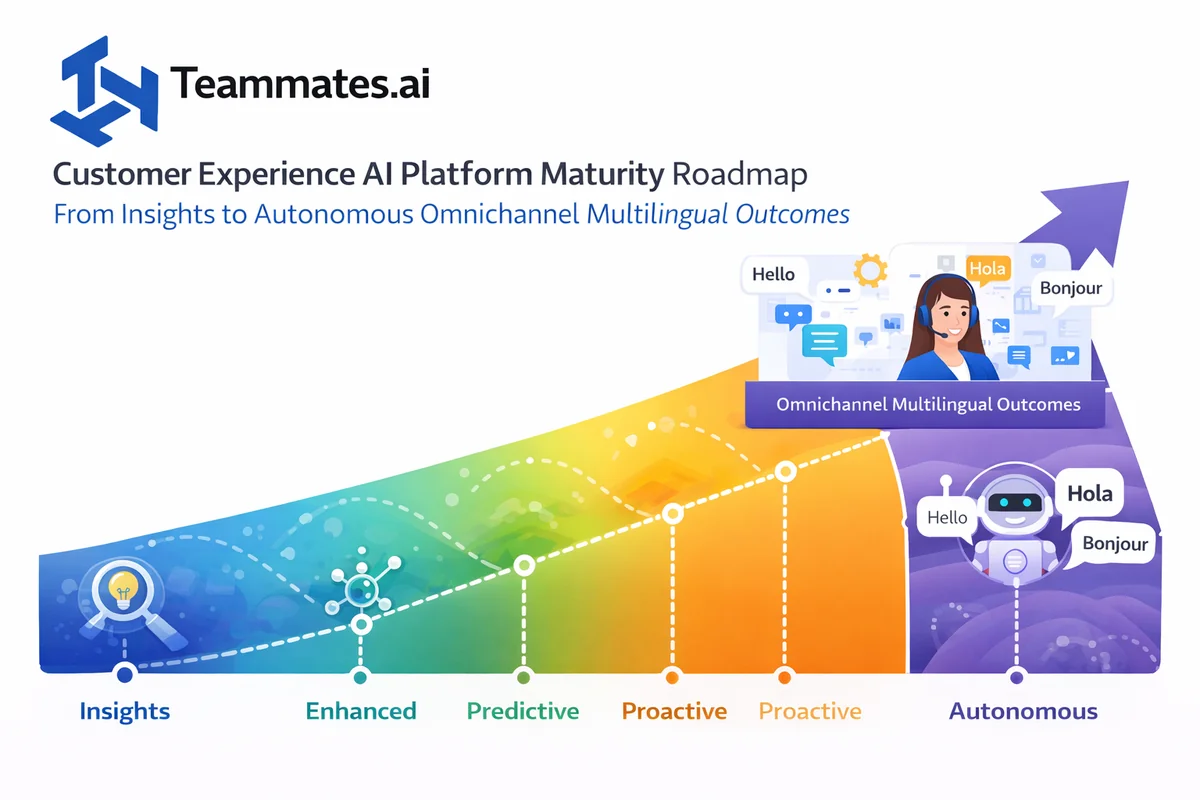
The maturity roadmap from visibility to autonomous outcomes
Customer experience AI maturity is not a model problem. It’s a sequencing problem. Teams fail by jumping from “we have transcripts” to “let’s fully automate,” without building the tooling, permissions, and operating model that make execution reliable.
Stage 1: Visibility
You centralize conversation capture across chat, voice, and email, then turn it into searchable, tagged data. This stage pays off when you can answer: “What are we talking about, and where do we bleed time?”
Typical components:
– Transcription and conversation logging
– Intent detection and tagging
– QA sampling and scorecards
– Basic topic and defect tracking
Limitation: visibility alone does not remove effort. It mainly reallocates it.
Stage 2: Guidance
Agent assist is where most vendors stop because it’s easy to demo. It recommends answers, summarizes calls, and suggests next steps.
Direct answer to a common question: Customer experience AI improves customer satisfaction when it reduces time to resolution and prevents repeat contacts, not when it produces better dashboards.
Limitation: you still depend on humans to execute every tool action, so cost per resolved ticket barely moves.
Stage 3: Partial automation
Now the system starts doing bounded work with approvals: drafting replies, prefilling forms, proposing refunds, preparing identity checks. The key is constrained tool calls and safe fallbacks.
What makes this stage work:
– Tool allowlists (exact actions the AI can take)
– Permission tiers (what can be done autonomously vs with approval)
– Rollback patterns (how you undo a bad action)
Stage 4: Integrated automation
This is the first stage that deserves the word “platform (conversational ai chatbot platform).” You orchestrate routing, knowledge, and workflows end-to-end across channels.
Direct answer to another common question: The best customer experience AI platform is the one that reliably completes your top workflows in your actual stack (Zendesk, Salesforce, HubSpot, identity, payments) with audit logs, not the one with the smartest-sounding replies.
The minimum bar here:
– Omnichannel routing with reasons (why it escalated, to whom, and with what context)
– Knowledge orchestration (grounded answers with source control)
– Workflow completion (ticket updates, CRM updates, refunds, cancellations)
If you are still thinking “chat only,” you are not omnichannel. Email and voice are where resolution debt hides because they require longer context, stricter policy, and better summarization.
Stage 5: Autonomous contact center
This is outcome-optimization: end-to-end resolution plus proactive outreach (for example, “payment failed, here’s a secure link,” or “order delay, here are options”) with continuous evaluation.
Direct answer to a third common question: AI in customer experience fails when it cannot safely take actions, cannot explain decisions, or cannot maintain multilingual parity in regulated workflows.
At this stage, you measure the right thing: effort removed per interaction, across all channels.
- Not just containment rate.
- Not just CSAT.
- Effort removed: handle-time avoided, follow-up reduction, and true first-contact resolution across chat, voice, and email.
Teammates.ai builds for Stage 5 from day one: autonomous Teammates that execute work across channels with integrated tooling, auditability, and multilingual parity (including Arabic dialect handling). If you want a deeper definition of what “platform” means in practice, see our ai conversational platform breakdown.
What to evaluate in a customer experience AI platform at a glance
A real customer experience AI platform is scored on execution breadth and execution reliability. “Understands intent” is table stakes. The differentiator is whether it can complete the outcome in your systems, under your policies, across your channels, at your volume.
Capability pillars to score
Use these pillars to keep evaluation honest:
– Conversation automation: resolve, not just respond
– Knowledge and answering: grounded, versioned, citeable
– Routing and workforce: skill-based, policy-based, reason-coded
– QA and insights: outcome QA, not just language QA
– Orchestration: tools, permissions, rollbacks, retries
– Analytics and experimentation: A/B tests on outcomes, not copy
Outcome KPIs that actually matter
If you only track containment, vendors will optimize to avoid escalation even when escalation is correct.
Track:
– Resolution rate (true first-contact resolution)
– Time to resolution (across channels, including email threads)
– Cost per resolved ticket (fully loaded)
– Escalation precision (escalate when it should, not when it panics)
– Backlog burn-down rate (does automation shrink queues weekly)
– For outbound: conversion rate and meetings booked rate
Key Takeaway: a platform that cannot act across voice and email is not omnichannel. It is a chat feature.
For additional context on what “feels human” actually means operationally (tone plus policy compliance plus correct escalation), read artificial intelligence for customer experience.
RFP-ready scorecard and demo script you can actually use
A customer experience AI platform should win or lose on proof of autonomous outcomes, not how polished the dashboard looks. If your evaluation cannot force end-to-end resolution, tool execution, and auditability across chat, voice, and email, you will buy an insights-optimizer and then wonder why your backlog does not move.
Weighted scorecard (copy/paste)
Use this weighting to keep teams from over-scoring UI and under-scoring execution.
- Outcomes (resolution, next-best-action execution, proactive workflows): 30%
- Integrations and orchestration (tool calls, permissions, rollback, retries): 20%
- Multichannel and multilingual parity (chat, voice, email, Arabic dialect quality): 15%
- Governance and compliance (audit trails, data residency, retention, approvals): 15%
- Analytics and QA (evaluation coverage, continuous monitoring): 10%
- Admin and ops (setup time, change management, queue controls): 10%
Demo script that forces truth
Bring your own reality. Vendors love “happy path” demos.
- Provide 20 recent tickets (10 easy, 10 messy) and 20 call recordings.
- Require the platform to resolve at least 10 cases end-to-end without a human typing.
- Require system-of-record updates: Zendesk status + tags, Salesforce or HubSpot fields, refunds or address changes where allowed.
- Force 5 escalations: show the reason, the evidence, and the exact handoff note.
- Run the same scenario in chat, voice, and email with the same policies.
- Inspect logs: every tool call, what data was accessed, what sources were used, and who approved what.
Key Takeaway: a “smart” response is irrelevant if the platform cannot reliably complete the workflow.
Red flags checklist
- The demo uses canned intents and pre-filled customer data.
- No tool permissioning by role, queue, or customer risk tier.
- No audit trail you could hand to compliance.
- “Omnichannel” means chat only, with voice handled by a separate module.
- Multilingual is “translation,” not native behavior (Arabic dialects are where this breaks first).
RFP question bank (the ones that surface real risk)
Ask these verbatim:
- Security: Do you have SOC 2 Type II and/or ISO 27001?
What is the scope?
– Privacy: GDPR/CCPA support, DPA terms, subprocessors list.
– Data residency: Can we pin data to a region?
What leaves the region?
– Retention: Can we set different retention per channel and queue?
– Model governance: How are prompts, policies, and tools versioned?
Can we roll back?
– Evaluation: What is your methodology for factuality and policy compliance?
How do you test multilingual parity?
– SLAs: Uptime, latency for voice, incident response timelines.
– Pricing and TCO: Are you charging per conversation, per minute, per resolution, or per agent seat?
What happens when volumes spike?
Comparison matrix template
| Category | What to test | Pass criteria | Notes |
|---|---|---|---|
| Autonomous resolution | End-to-end closure on real cases | Ticket resolved, customer notified, systems updated | No human typing |
| Tool execution | CRM, ticketing, payments/identity | Permissioned calls, retries, rollback | Logs required |
| Omnichannel | Chat + voice + email | Same brain, same policies | No separate “voice bot” |
| Governance | Audit trails + approvals | Exportable logs, policy versioning | Compliance-ready |
| Multilingual | Arabic dialect + long-tail languages | Native intent and tone, not translation | Parity tests |
Implementation blueprint for outcomes with data, integrations, and operating model
Autonomous outcomes are an operating model plus integrations plus evaluation coverage. Teams fail when they treat a customer experience AI platform as a model rollout instead of a workflow rollout. The sequencing that works is: unify data, constrain tools, launch one queue, then expand channels and languages.
30-60-90 day rollout plan
- Days 0-30: Instrument and unify
– Connect ticketing (Zendesk), CRM (Salesforce/HubSpot), and knowledge base.
– Define 10-20 intents tied to business outcomes, not labels. (If “shipping” does not end in “update address” or “create replacement,” it is not an intent.)
– Build grounding: approved articles, macros, policies, and “what not to say.”
– Create an evaluation set: 200+ historical conversations including edge cases. - Days 31-60: Constrained automation
– Allowlist tools and fields the agent can touch.
– Launch assisted resolution first: draft, propose tool calls, require approval for risky actions.
– Add smart escalation reasons and structured handoff notes. - Days 61-90: Scale channels and languages
– Expand to voice and email with the same intent and policy layer.
– Add proactive workflows (payment retry, appointment reminders, churn saves).
– Push multilingual parity, including Arabic dialect scenarios, as a first-class test suite.
Integration reference architecture (what “integrated” actually means)
A customer experience AI platform is a coordinator of systems, not a destination.
- Entry channels: chat widget, email inbox, CCaaS/voice
- System of record: Zendesk or equivalent
- CRM: Salesforce or HubSpot
- Knowledge: CMS, Notion/Confluence, help center
- Identity and payments: SSO/IDV, Stripe/Adyen equivalents where relevant
- Analytics: event stream to your BI or CDP if you need lifecycle attribution
If you want a practical model for routing by outcome (not just intent), start with intention detection.
Operating model roles (non-negotiable)
- CX product owner: owns outcomes and queue expansion.
- Knowledge manager: owns source quality and deprecations.
- Conversation designer: owns prompts, escalation language, tone.
- AI ops owner: owns evaluations, drift monitoring, incident response.
- Compliance owner: owns policies, approvals, retention.
- Escalation owners: named humans per queue with SLAs.
Pre-launch readiness checklist
- Knowledge coverage for top 20 intents is current.
- Tool permissions are tiered (read vs write, low vs high risk).
- Escalation map is explicit.
- Evaluation set includes multilingual and voice.
- Rollback plan exists for prompts, policies, and tool access.
Common failure modes: disconnected knowledge, unowned evaluations, routing without reasons, and automation without auditability.
Trust, safety, and governance for agentic CX in regulated environments
Agentic CX is only safe when the platform can prove what it did, why it did it, and what data it touched. “We have guardrails” is not governance. Governance is: grounded answers, permissioned tools, human escalation policies, continuous evaluation, and audit logs that survive a real compliance review.
Guardrails that matter
- Grounding via retrieval: answers cite approved sources. If no source, the agent asks or escalates.
- Allowlisted tools: the agent can only use approved actions (create ticket, issue refund up to X, update address with verification).
- Permission tiers: different capabilities per queue, customer segment, and risk.
- PII handling: redaction in logs, field-level masking, and “never store” controls.
- Safe completion constraints: block prohibited content and enforce required disclosures.
- Rate limits and rollback behavior: prevent runaway automation and enable fast reversion.
Human-in-the-loop policies (simple and enforceable)
Auto-resolve when:
– low-risk request, high-confidence intent, and a valid knowledge source.
Ask a clarifying question when:
– two intents are plausible or required data is missing.
Escalate when:
– identity is uncertain, payment or account access is involved, policy conflicts occur, or the customer is already on a churn path.
Evaluation and monitoring (what you actually measure)
You should monitor:
– factuality and source coverage
– policy compliance rate
– resolution outcomes (closed without follow-up within 7 days)
– escalation precision (escalations that humans agree were necessary)
– multilingual parity (same pass rate across languages, including Arabic dialects)
For context on what “human” quality feels like at scale, see artificial intelligence for customer experience.
Audit trails (the compliance line in the sand)
An auditable platform logs every tool call, source citation, decision rationale, and data access event. If you cannot reconstruct a conversation’s actions end-to-end, you cannot run autonomous CX in regulated environments.
Why Teammates.ai is the customer experience AI platform built for autonomous outcomes
A customer experience AI platform earns the name when it can resolve, route, escalate, and update systems of record across chat, voice, and email. Teammates.ai is built as an outcome-optimizer: our AI Teammates are not chatbots, assistants, copilots, or bots. Each Teammate is composed of many AI Agents, each specialized in one part of end-to-end execution.
The Teammates.ai lineup (and what they execute)
- Raya: autonomous omnichannel customer support across chat, voice, and email, with integrated ticketing and CRM updates and Arabic-native dialect handling.
- Adam: autonomous outbound and lead qualification across voice and email that handles objections, books meetings, and syncs to HubSpot and Salesforce.
- Sara: instant candidate interviews at scale when CX organizations also own high-volume hiring and need consistent screening artifacts.
What actually works at scale is integrated orchestration plus measurable effort removed per interaction. If you want a grounded view of who truly resolves tickets, use our benchmark of contact center ai companies.
FAQ
What is a customer experience AI platform?
A customer experience AI platform is software that understands customer conversations and takes action to improve outcomes across channels. The dividing line is execution: if it cannot resolve and update systems of record with auditability, it is analytics software with a chat UI.
How is a customer experience AI platform different from a chatbot?
A chatbot is a front-end conversation layer. A customer experience AI platform orchestrates routing, knowledge, tool execution, escalation, and measurement across chat, voice, and email. Chatbots answer. Platforms complete workflows.
What KPIs matter most for CX AI?
The KPIs that matter are resolution rate without follow-ups, time to resolution, cost per resolved ticket, escalation precision, and effort removed per interaction. Containment rate alone is a vanity metric if customers come back or humans still do the work.
Can CX AI platforms handle voice and email with the same quality as chat?
Yes, but only when the same policies, knowledge grounding, and tool layer operate across channels. Many vendors bolt voice onto a chat stack, which breaks escalation logic and makes audit trails inconsistent.
Conclusion
A customer experience AI platform is defined by outcomes, not dashboards. If it cannot autonomously resolve conversations end-to-end across chat, voice, and email and proactively drive the next best action with auditability, it is an insights-optimizer that will not move your operational metrics.
The practical path is sequencing: unify data, constrain tools, launch one queue, then scale channels and multilingual parity (including Arabic dialects). Evaluate vendors with an RFP that forces real workflow completion, tool reliability, and compliance-grade logging.
If you want to build toward an autonomous multilingual contact center without heavy engineering, start with Teammates.ai and deploy Raya in one measurable queue, then expand.




















