
Cold Email Follow Up Templates That Work at Scale Start With Signal Based Selection
A cold email follow up only scales when your team makes the template decision based on two inputs: what the prospect did and what they objected to. When you treat follow-ups as timed “nudges,” you create repetitive threads, duplicate content, and vague CTAs that buyers ignore and filters penalize.
Here’s the operating model we use (and what Teammates.ai Adam operationalizes end-to-end):
- Behavior signal (observable): open, click, reply type, OOO, forward, bounce.
- Objection type (interpreted): timing, authority, budget, not interested.
- Funnel stage (context): first-touch follow-up, post-asset follow-up, post-call attempt, post-referral.
Key Takeaway: You don’t need 20 cold email follow up templates. You need 6 to 10 templates that are each tied to a specific signal + objection, with micro-personalization fields your CRM can populate automatically.
Micro-personalization slot format (copy-paste)
Use one slot per follow-up, not five. Over-personalization reads fake.
- {FirstName}, {Company}, {Role}
- {RelevantTrigger} (funding, hiring, new product line, expansion)
- {TechStack} (from BuiltWith, job posts, security page)
- {MutualConnection}
- {LastTouchSummary} (one line: “You clicked the case study on X”)
Internal link opportunities: see our personalized email examples and objection handling framework for how to source triggers reliably.
Follow Up Selector Matrix Based on Opens Clicks Replies and Funnel Stage
A follow up cold email template should change when the prospect’s behavior changes. The goal is not “send more emails.” The goal is to route to the next best question (email), next best interruption (call/voicemail), or next best context (LinkedIn).
Selector matrix (at a glance)
| Prospect signal | Your goal | Subject strategy | Recommended CTA | Objection mapping | Mini-template |
|---|---|---|---|---|---|
| Opened, no reply | Pattern interrupt + single question | Keep subject, stay in-thread | 15-second yes/no | Usually timing or relevance | “{FirstName}, did I miss the mark, or is {RelevantTrigger} making this a Q{Quarter} thing for {Company}?” |
| Clicked, no reply | Convert intent to next step | Keep thread, add “quick question” | Offer 2 options | Often authority or budget | “Saw you checked {AssetName}. Should we (1) benchmark {Metric} for {Company} or (2) I send 3 bullets on how teams handle {Problem}?” |
| No open (2x) | Reset deliverability + relevance | New subject, shorter | Permission-based | Relevance or inboxing | “Trying a new subject in case the last one got buried. Are you the right owner for {ProblemArea} at {Company}?” |
| Replied “not now” | Capture timing + earn future permission | Same thread | Pick a date | Timing | “Got it. When should I resurface, and what needs to be true for it to be worth a 10-min chat?” |
| Replied “not interested” | Confirm close, reduce complaints | Same thread | Close-the-loop | Not interested | “Understood. I’ll close this out. If helpful, I can send one {AssetType} on {Topic} and then stop. Want it?” |
| OOO | Respect boundary, reschedule | Same thread | Confirm next date | Timing | “Thanks for the heads-up. I’ll follow up after {ReturnDate}. If someone else owns {Area}, who should I contact?” |
| Forwarded to colleague | Convert intro into multi-thread handoff | New email to colleague, CC optional | Confirm owner | Authority | “{Name} suggested you’re closest to {Area}. We help with {1-liner}. Worth a quick triage call?” |
| Asked for info, then went dark | Re-anchor value + reduce effort | Same thread | Two-choice CTA | Budget or priority | “Should I (a) send pricing ranges/pilot outline, or (b) pause until {Timeframe}?” |
What to log in your CRM (so you can route, not guess)
If you can’t measure it, you can’t scale it.
- Last action: opened, clicked, replied, bounced
- Intent label: none, curious, active, negative
- Objection label: timing, authority, budget, not interested
- Next channel: email, call, LinkedIn
- Next touch date: based on signal (OOO date, “not now” date), not sequence day-count
This is exactly where Teammates.ai Adam earns its keep: autonomous routing based on reply signals, with integrated logging so you can review throughput by intent and objection, not just open rate.
Troubleshooting: “What if opens are unreliable?”
Opens are noisy due to privacy features. Treat “open” as a soft signal and weight clicks, replies, and forwards higher. If you can’t trust opens, default to shorter follow-ups, fewer links, and more permission-based CTAs.
Cold Email Follow Up Templates by Objection Type With Micro Personalization Slots
Objection-based cold email follow up templates work because they match how buyers actually respond: they don’t say “no,” they say not now, not me, no budget, or stop. Your job is to reply with a template that (1) acknowledges the objection, (2) reduces effort, (3) captures the next routing signal.
Objection 1: Timing (not now, next quarter, backlog)
Use this when you get any variant of “circle back.” Do not argue. Get a date and a condition.
Template: timing capture + permission
- Subject: Re: {OriginalSubject}
- Body:
- “Makes sense, {FirstName}. Is this more realistic after {TimeboxOption}?”
- “So I don’t pester you: what needs to be true for {Company} to prioritize {ProblemArea} (ex: {RelevantTrigger} / {HiringPlan} / {OpenTicketTheme})?”
- “If you share a month, I’ll set a reminder and stop until then.”
In-thread vs new thread: stay in-thread. This is a relationship and memory game.
Objection 2: Authority (not the right person, who owns this?)
Use this when you’re talking to a smart person who simply doesn’t own the workflow.
Template: forwardable blurb + owner request
- Subject: Quick redirect?
- Body:
- “Thanks, {FirstName}. Who owns {ProblemArea} at {Company} – {RoleOptionA} or {RoleOptionB}?”
- “Forwardable blurb (2 lines): We help {ICP} reduce {Pain} by {Mechanism}. Common starting point is {PilotScope}.”
- “If you point me to the right person, I’ll take it from there.”
Pro-Tip: Do not ask for “an intro.” Ask for “the right owner,” then do the outreach yourself.
Objection 3: Budget (no budget, freeze, already have vendor)
Budget objections are often priority objections. Your follow-up should offer a lower-risk path (benchmark, pilot) and a clean close option.
Template: ROI anchor + alternative path
- Subject: Re: {OriginalSubject}
- Body:
- “Understood on budget, {FirstName}. If it helps, teams typically justify this off {Metric} (ex: {CostCenter} hours, {RevenueLeak}, or {Risk}).”
- “Two options: (1) I send a 1-page benchmark checklist for {ProblemArea}, or (2) we scope a small pilot around {PilotScope}.”
- “Which is more useful?”
In-thread vs new thread: in-thread if they replied. New thread only if you’re re-positioning after silence.
PAA: How many follow-up emails should you send?
Send 3 to 5 total touches per thread (including the first email), then stop unless you get a positive signal (reply, click, referral, explicit timing). Beyond that, you increase complaint risk and harm deliverability for the rest of your domain.
When to Switch Channels Email to Call to LinkedIn Using Reply Patterns
Switching channels should be triggered by prospect behavior, not your sequence calendar. When you move from email to voice or LinkedIn at the right moment, you stop looking like an automated drip and start looking like a persistent operator who respects attention. The goal is simple: keep the conversation moving without adding spam risk.
Use these routing rules:
– No open twice (or only “pixel opens”): restart with a new subject, then switch to LinkedIn if no response.
– Clicked, no reply: call within 24-48 hours with a single question tied to what they clicked.
– Short negative reply (“not interested”): one clean close-out email, then stop.
– OOO: schedule a re-touch for the return date, do not “check in” mid-OOO.
– They asked a question, then went dark: phone call or LinkedIn message that references the unanswered question.
– Forwarded to a colleague: route to the colleague immediately and CC the forwarder once.
Channel-switch plays (copy-paste)
Email → call: 20-second voicemail
“Hi {FirstName}, this is {YourName}. I emailed about {RelevantTrigger}. Quick question: are you the right person for {Outcome}, or should I speak with someone else on {TeamName}? I will send a one-liner follow-up email as well.”
Email → LinkedIn connect note (no pitch)
“{FirstName} – reached out by email about {RelevantTrigger}. Thought I would connect here in case email is buried. If you are not the right owner, who is?”
LinkedIn → email recap (keeps compliance clean)
Subject: Re: {Outcome} for {Company}
“{FirstName}, sent you a connect note on LinkedIn as well. Keeping this simple: is {Problem} on the roadmap, or is it a non-issue for {Company} this quarter?”
Stop signals (do not override)
– Explicit “stop,” “unsubscribe,” or “do not contact”
– Repeated bounces
– “Not my role” plus no referral
– Procurement/legal instruction to cease
At Teammates.ai, Adam uses these same behavior-based triggers to route the next touch across email, voice, and LinkedIn while keeping messaging consistent and logged end-to-end, which is where most teams break.
Follow Up Deliverability Checklist Built Specifically for Follow Ups
Follow-up deliverability fails differently than first-touch. The two killers are (1) duplicate-body filtering across your own sequence and (2) degraded reputation from repeated “checking in” emails that generate deletes and complaints. A cold email follow up template is only as good as the guardrails you wrap around it.
Checklist (follow-up specific)
- Thread strategy
- Stay in-thread when they replied, asked a question, clicked, or forwarded. Continuity increases response.
-
Start a new thread after 2-3 no-opens, when you need a subject reset, or when the original thread is long.
-
Avoid duplicate-body filtering
- Change the first line every time.
- Reorder proof points.
- Swap CTA structure (question vs two-choice vs “close the loop”).
-
Rotate the “why you, why now” angle: trigger, peer example, risk, or benchmark.
-
Link hygiene
- Prefer zero links in early follow-ups.
-
If needed, use one clean link (no UTMs) and avoid attachments until there is active engagement.
-
Plain-text style
-
Plain-text formatting reduces rendering quirks and looks like 1:1 outreach.
-
Tracking tradeoffs
- Open tracking creates false positives (security scanners) and can add spam signals.
-
Track outcomes you can trust: replies, meeting booked, “not now,” “wrong person,” clicks (if you keep links).
-
Volume and distribution
- Follow-ups should be a smaller portion of each mailbox’s daily sends.
- Spread sends across personas and segments to avoid “burst” patterns.
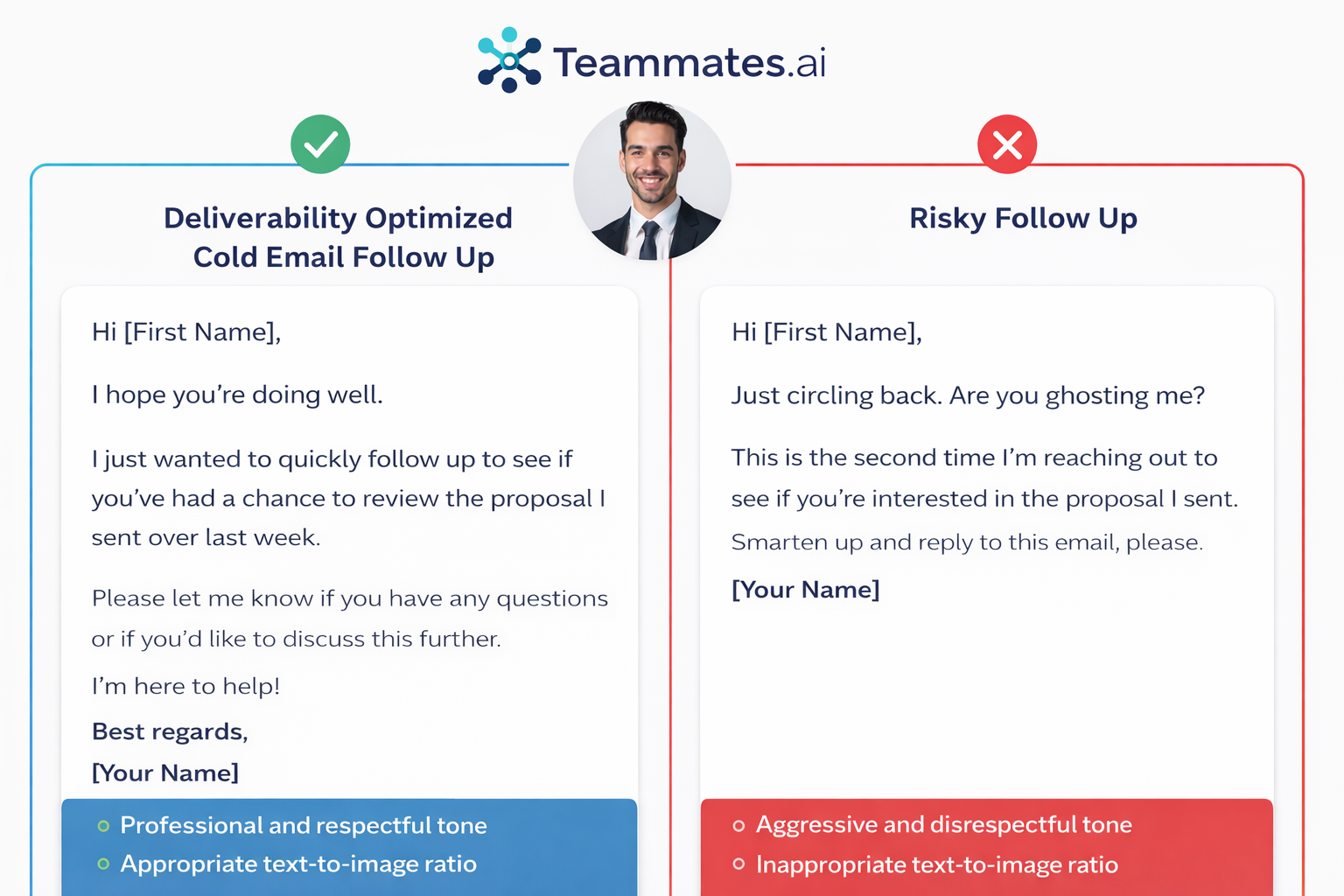
Deliverability example: safe vs risky follow-up
Deliverability-optimized
Subject: Quick yes/no
“{FirstName}, should I speak with you or {AltRole} about {Outcome}? If it is not a priority, tell me and I will close my loop.”
Why it is safe: short, no links, low complaint language, single question.
Risky
Subject: Following up again!!!
“Just circling back to my last 3 emails. Here is my deck + calendar + case study link + pricing. Are you free Tuesday at 2?”
Why it is risky: repeated “follow-up” phrasing, multiple links, attachment behavior, and a high-pressure meeting ask.
Teammates.ai Adam enforces these guardrails by standardizing template variants and logging which variant was sent, so you can test without accidentally cloning the same body across 50,000 follow-ups.
Compliance and Ethical Boundaries for Cold Email Follow Up CAN SPAM GDPR and PECR
Compliance is not a legal checkbox, it is an operational policy. Follow-ups are where teams create the most risk because they ignore stop signals, keep nudging during OOO, or cannot explain where the contact data came from. Your follow up cold email template should include governance as part of the workflow.
What you must include (US CAN-SPAM baseline)
- Accurate “From” and subject line
- A physical address (company mailing address)
- A working opt-out mechanism (even for 1:1 style outreach)
- Honor opt-outs promptly
EU/UK (GDPR + PECR) practical rules
- Use a lawful basis for outreach (often legitimate interest in B2B, but document it)
- Minimize data, store it securely, and be ready to disclose source and purpose
- Be careful with personal emails and consumer contexts where PECR is stricter
Unsubscribe language that fits 1:1 outbound
Pick one and keep it consistent:
– “If you are not the right person or you would prefer I do not follow up, reply ‘stop’ and I will close this out.”
– “Not relevant? Tell me and I will not email again.”
Recommended max follow-up policy
- 3-5 total touches per thread is a clean default.
- Stop immediately on: explicit no, unsubscribe/stop, role mismatch with no referral, repeated bounce, or legal/procurement instruction.
Data source documentation (be able to answer this)
If asked “where did you get my info,” you should be able to say:
– Source category (company website, conference list you attended, published directory, LinkedIn)
– Why you contacted them (role relevance + business reason)
– How to opt out
Teammates.ai keeps outreach audit-friendly by ensuring stop signals and consent notes are logged to the CRM record, not trapped in an inbox.
Why Teammates.ai Adam Becomes Your Default Follow Up System
A template library does not fix follow-up performance. Systems do. The teams with predictable meetings treat follow-ups as signal routing plus execution: behavior-based template selection, micro-personalization from CRM fields, channel switching, and deliverability and compliance guardrails that do not rely on human memory.
Adam is built for that operating model:
– Autonomous routing based on opens, clicks, reply patterns, OOO, and forwards
– Integrated email + voice execution with consistent objection handling
– Scalable micro-personalization driven by CRM fields and triggers
– Intelligent logging to HubSpot/Salesforce-style workflows so measurement is real
What to optimize (beyond open rate):
– Reply rate and positive reply rate
– Meeting booked rate
– Time-to-first-reply
– Complaint rate and bounce rate
If you want the follow-up playbook to run the same way every day, across every rep and segment, you need an end-to-end operator, not a document.
Conclusion
Cold email follow-ups only work at scale when you stop treating them like scheduled reminders and start treating them like signal-based routing. Pick the next cold email follow up template based on what the prospect did (open, click, reply, OOO, forward) and what they objected to (timing, authority, budget, not interested). Then protect deliverability, enforce stop signals, and switch channels based on behavior.
If you want this executed consistently across email, voice, and LinkedIn with integrated logging and governance, Teammates.ai Adam is the system that operationalizes it end-to-end.
Sources and Evidence