
The Quick Answer
VAD voice activity detection is the component that decides when someone is speaking and when they stopped. The common mistake is assuming “better VAD” improves ASR accuracy. It usually does not. VAD mainly affects endpointing latency, barge-in, and turn-taking feel. Choose VAD settings by workflow (sales vs support vs voicemail) and validate with false activations per hour, miss rate, and end-of-speech delay, not WER.
VAD voice activity detection is the component that decides when someone is speaking and when they stopped. The common mistake is assuming “better VAD” improves ASR accuracy. It usually does not. VAD mainly affects endpointing latency, barge-in, and turn-taking feel. Choose VAD settings by workflow (sales vs support vs voicemail) and validate with false activations per hour, miss rate, and end-of-speech delay, not WER.
Here’s the stance we take at Teammates.ai: optimizing VAD for “snappy” endpointing without a production tuning loop makes voice agents feel broken, even if transcripts look fine. You don’t lose customers because WER is 2 percent higher. You lose them when the agent cuts people off, talks over them, or sits in dead air. This piece separates ASR accuracy from turn-taking control, then shows the evaluation and tuning mechanics teams skip.
The myth better VAD equals better ASR
Better VAD does not automatically produce better ASR, because VAD is not an accuracy model in the same sense. VAD is a control system that decides when to start listening, when to stop, and when to hand a turn to the agent. You can hold WER constant and still wreck the conversation if endpointing behavior is wrong.
Most teams bundle these into one “quality” bucket:
–Word error rate (WER): how accurate the transcript is.
–Endpointing latency: how long the system waits before it decides the user is done speaking.
If you optimize endpointing latency aggressively, you create three failure modes that WER will not catch:
–Cut-offs: final syllables get truncated, so intent flips (especially in Arabic dialects where short endings can carry meaning).
–False triggers: background noise starts “speech,” so your agent interrupts or sends the conversation down the wrong flow.
–Awkward turn-taking: the agent waits too long, so users repeat themselves or barge in.
Business outcomes in an autonomous multilingual contact center live downstream of those failures: higher escalation rates, lower containment, longer handle time, and compliance risk when your agent takes actions on phantom speech.
At Teammates.ai we treat VAD as a control layer inside an integrated streaming stack. The goal is not “best VAD model.” The goal is “best turn-taking for the workflow,” validated on production-like duplex audio.
What VAD actually controls in an autonomous contact center
VAD controls turn-taking, not transcription. In a real-time voice agent, VAD sits upstream of everything that feels human: when the agent starts processing, when it speaks, and whether it yields on interruption. That is why small VAD mistakes feel bigger than small ASR mistakes.
A practical streaming loop looks like this:
- Audio arrives in frames (typically 10/20/30 ms).
- VAD outputs a speech probability per frame.
- Endpointing rules convert probabilities into “speech started” and “speech ended.”
- ASR consumes the audio segment and emits partials and finals.
- The agent policy decides: keep listening, respond, confirm, escalate.
- TTS plays back audio, while barge-in monitors for interruption.
Two terms matter if you’re shipping autonomous agents:
–Barge-in is a policy feature: the agent should stop speaking when the user starts.
–Endpointing is a control feature: the system should decide the user stopped, fast enough to feel responsive, but not so fast it truncates.
Why VAD errors feel worse than ASR errors:
- A one-word ASR error might be recoverable with clarification.
- A bad endpoint makes the agent behave rudely or randomly, which users interpret as “this thing doesn’t work.”
This is also why omnichannel consistency matters. If you unify voice with chat and email routing, your “conversation state” needs stable turn boundaries. Otherwise, the same intent lands in different flows depending on whether the user spoke fast, paused mid-sentence, or had background noise. If you’re building intent-driven automation, VAD quality directly affects downstream routing and resolution (see ai intent).
Regulated environments add a constraint most demos ignore: you need deterministic, auditable endpointing parameters and measurable false activation rates. “It sounded fine in the office” does not pass review.
How to evaluate VAD in a way that predicts production outcomes
If you only report VAD F1 on clean clips, you’re measuring the wrong thing. Production failures come from boundary errors (too early, too late) and false activations under noise, echo, and duplex audio. Your evaluation has to predict those.
Frame-level vs segment-level evaluation
Frame-level metrics score each 10-30 ms frame as speech or non-speech. Segment-level metrics score contiguous speech regions with an overlap tolerance. Segment-level is closer to conversation reality because users do not care about a few mis-labeled frames. They care when you chop words or wait too long.VAD is a detector, but endpointing is the product. So measure boundary drift.
Minimum metrics we recommend publishing internally on every change:
–Precision / recall / F1 (frame or segment, but be consistent)
–False activation rate per hour (how often non-speech triggers speech)
–Miss rate (how often speech is not detected)
–Time-to-trigger (speech start detection latency)
–End-of-speech delay distribution (p50/p90/p99), not just an average
A reproducible test harness (what actually works at scale)
You need a harness that recreates your channel and your noise.
- Start with labeled corpora (speech vs non-speech), then add your own call snippets.
- Mix in noise conditions: keyboard, cafe, car, call center bed, TV-in-background.
- Replay throughtelephony bandpass (8 kHz) and codecs you deploy.
- Evaluate per condition and per channel (PSTN vs WebRTC).
Pro-Tip: if you do only one thing, computefalse activations per hour on non-speech-heavy audio (hold music, silence, breathing, agent-side echo). That single metric predicts “random interruptions” better than any leaderboard score.
Comparison table (what to require in a bake-off)
Don’t accept “best overall F1.” Require clean vs noisy, plus latency and false triggers.
| Option | Strength at a glance | Weakness that bites in production | What to measure before shipping |
|---|---|---|---|
| WebRTC VAD | Fast, tiny, easy in browsers | Prone to false triggers and tuning limits in tough noise | False activations/hr on duplex + p99 end-of-speech delay |
| Silero VAD | Strong accuracy on many conditions | Needs thresholding and smoothing discipline | Miss rate on accented speech + boundary drift |
| Picovoice-style | Tuned for embedded/on-device | Model behavior varies by environment and mic | Time-to-trigger + battery/CPU budget |
| API-based VAD | Quick to integrate centrally | Latency, cost, and limited control knobs | End-to-end endpointing latency and jitter |
Key Takeaway: pick the VAD that meets your false-trigger budget and end-of-speech delay target for your workflow, not the one with the prettiest average score.
If you’re building real-time call automation, you’ll also want to align this with your overall endpointing strategy (VAD-only vs hybrid with ASR partials). That’s the difference between a demo and production-grade behavior (see voiceactivitydetection).
Key Takeaway: VAD voice activity detection should be evaluated like a turn-taking control system, not a speech model. If you only report F1 or, worse, WER, you will ship agents that sound glitchy because the failures that matter are boundary drift, false triggers, and end-of-speech delay.
Frame-level scores are not the product, segments are
Frame-level precision/recall tells you if the model labels 10-30 ms slices correctly. Customers do not experience frames. They experience segments: when the agent starts listening, when it stops, and whether it cut the last word.
Segment-level evaluation is closer to reality because it tolerates small boundary shifts (for example, +/- 200 ms) and still penalizes the stuff that breaks conversations: clipping, long tails, and jitter.
The minimal metric set we expect to see
If your VAD evaluation report does not include these, it is not a production report:
- Precision, recall, F1 (segment-level, with overlap tolerance)
- False activation rate per hour (FAR/h): how often non-speech becomes “speech”
- Miss rate: how often real speech is treated as silence
- Time-to-trigger: time from speech onset to “speech detected”
- End-of-speech delay: time from speech end to “speech ended” (report p50, p90, p99)
Direct answers to common questions:
–Does VAD improve ASR accuracy? No. It mostly changes what audio gets sent and when the system commits a final transcript, which affects turn-taking more than WER.
–What is a good end-of-speech delay? It depends on the workflow. Sub-300 ms feels snappy but risks cut-offs; 500-900 ms is safer for support and voicemail.
–What causes false triggers? Non-speech transients (keyboard clicks, clacks, packet loss artifacts), echo, and music-on-hold are the usual culprits.
A reproducible test harness that survives reality
You do not need a research lab. You need a harness that matches your audio path.
- Collect a labeled corpus with speech and non-speech segments (include overlap and backchannels like “uh-huh”).
- Replay it through your real channel conditions:
– Telephony bandpass (8 kHz), codecs, AGC, packet loss simulation
– WebRTC with jitter buffer behavior - Mix in noise at multiple SNRs (office, cafe, car), plus keyboard and mouse clicks.
- Run VAD + your endpointing rules (hangover, hysteresis), not just the raw model.
- Compute the metric set above per condition and per language bucket.
If you are building an autonomous contact center, also break results out by duplex state: silence, single-talk (user), single-talk (agent TTS), and double-talk. Duplex audio is where “best VAD” demos go to die.
At-a-glance comparison table (what to measure, not who to worship)
The point is not that one option is “the best.” The point is that you must compare on latency and false triggers under your channel.
| VAD option | Strength | Typical failure mode in calls | What to benchmark |
|—|—|—|—|
| WebRTC VAD | Low compute, easy to ship | Music/echo false activations, coarse thresholds | FAR/h under AEC stress, p99 end delay |
| Silero VAD | Strong on varied speech | Needs tuning for telephony + noise; can jitter at low thresholds | Trigger jitter vs frame size, miss rate on short utterances |
| Picovoice (or similar SDK) | Productized, low latency | Channel-specific surprises, licensing constraints | FAR/h on keyboard/cafe, trigger time |
| API-based VAD | Centralized updates | Network adds latency, harder to test end-to-end | End-to-end endpoint latency, p99 tails |
If you want the straight operational view of VAD in call automation, start with our voiceactivitydetection breakdown and then build your harness around your own telephony/WebRTC path.
Tuning VAD for production without breaking the conversation
VAD voice activity detection quality in production is mostly thresholding and timing, not model choice. The “feel” knobs are frame size, hysteresis, hangover padding, and noise adaptation. If you tune only for low endpointing latency, you will increase cut-offs and false triggers.
Frame size is a latency vs stability lever
–10 ms frames: fastest reaction, most jitter. Requires smoothing or you get rapid flip-flops.
–20 ms frames: common sweet spot for contact center audio.
–30 ms frames: more stable, but adds perceivable delay and can smear short interjections.
Pro-Tip: choose frame size based on your barge-in strategy. Aggressive barge-in with 10 ms frames without smoothing usually produces “stutter stop-start” endpointing.
Threshold calibration is cost calibration
Pick an operating point by assigning explicit costs:
– False activation cost: interruptions, wrong actions, compliance risk
– Miss cost: dead air, missed intent, escalation
Then calibrate per channel type (PSTN, WebRTC, mobile). One global threshold is how teams end up with “works in the office, fails in the field.”
Hysteresis and hangover are the real endpointing controls
–Hysteresis is a two-threshold system: a higher threshold to start speech, a lower one to stay in speech. It prevents chatter.
–Hangover is padding after speech ends (for example 300-800 ms) to capture trailing consonants and breathy endings.
A VAD model can be “accurate” and still produce terrible turn-taking if hangover is wrong.
Noise-floor adaptation (and when to freeze it)
Noise adaptation is a rolling estimate of background energy used to shift thresholds as environments change. It works well in cafes and cars.
It fails when you “learn the speaker as noise.” Freeze adaptation during detected speech, and reset only after stable silence windows.
Troubleshooting: failure -> fix
–Trailing consonants cut off -> increase end padding (hangover) and lengthen release time.
–Keyboard noise triggers -> raise start threshold, add band-limited energy check (speech band), smooth scores.
–Far-field echo triggers during TTS -> use AEC, then duplex-aware gating so agent TTS does not re-trigger VAD.
–Double-talk feels chaotic -> policy-level rule: when user speech probability rises, duck TTS and require sustained speech before hard barge-in.
If you need the channel fundamentals, our vad audio guide covers the practical audio constraints that drive these tuning decisions.
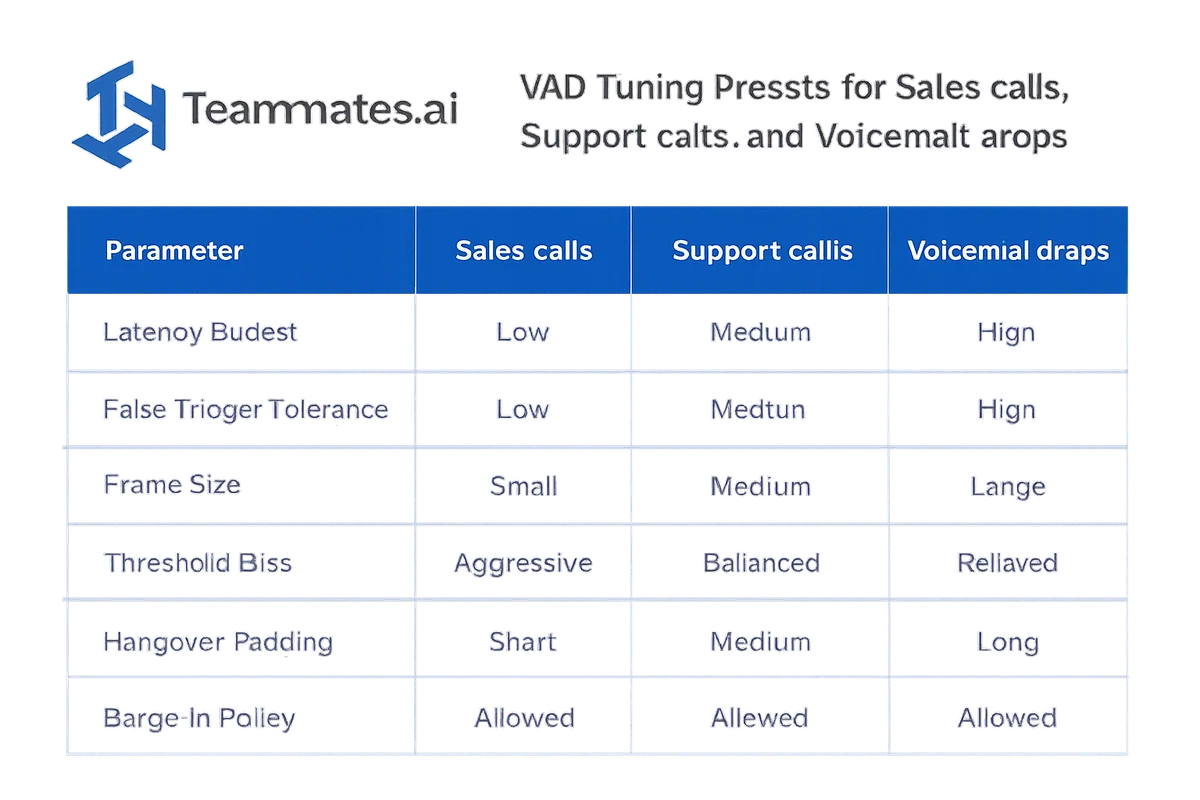
Decision table for VAD settings by workflow sales vs support vs voicemail
Key Takeaway: there is no universal “best” VAD voice activity detection setup. You tune endpointing to the interaction goal. Sales needs faster barge-in and tolerance for overlap. Support needs lower false activations and safer end padding. Voicemail needs conservatism and capture.
| Workflow | Primary goal | Latency budget | False activation tolerance | Recommended settings |
|---|---|---|---|---|
| Sales (Adam) | Keep pace, handle objections | Low | Medium | 10-20 ms frames, lower start threshold, moderate hangover (300-600 ms), aggressive barge-in with smoothing, heavy ASR partial usage |
| Support (Raya) | Containment and correctness | Medium | Low | 20 ms frames, higher start threshold, longer hangover (500-900 ms), conservative barge-in, partials gated until stable speech |
| Voicemail | Capture complete message | High | Very low | 20-30 ms frames, higher threshold, longer confirmation window before “speech started,” long hangover, barge-in off |
Why this matters downstream: endpointing changes intent classification and routing. If you clip “not” or “cancel,” your ai intent layer looks broken even if the ASR WER barely moves.
Why Teammates.ai is the standard for VAD-driven turn-taking at scale
Teammates.ai wins here because we treat VAD voice activity detection as part of an integrated streaming stack: duplex audio, endpointing rules, ASR partial/final behavior, and an autonomous agent policy that can handle interruptions without sounding robotic.
Most teams run a model bake-off, pick a VAD, and call it done. That approach collapses under:
- Echo from TTS in real duplex calls
- Noisy, compressed telephony audio
- Multilingual variability (including Arabic dialects) where pause patterns differ
- Regulated flows where you need deterministic, auditable behavior
Teammates.ai standardizes the unglamorous but decisive pieces: per-channel presets, a repeatable evaluation harness (FAR/h and end-delay distributions, not just F1), and continuous calibration against real call distributions. This is how our autonomous Teammates like Raya (support) and Adam (sales) stay stable across languages and environments.
Conclusion
VAD voice activity detection is not an ASR accuracy lever. It is a turn-taking control system, and optimizing it for low endpointing latency without a tuning and evaluation loop is how you get barge-in chaos, cut-offs, and false triggers while WER stays flat.
Build a production-grade harness, measure FAR/h and end-of-speech delay distributions, and tune frame size, thresholds, hysteresis, and hangover per workflow. If you want this to work at scale across telephony and WebRTC in 50+ languages, treat VAD as one component in an integrated autonomous pipeline. That is the approach we ship at Teammates.ai.